
Ground stations are the communications path between teams and their spacecraft. Without at least one valid station, Space Range cannot build the ground-controller path that teams use to talk to their spacecraft.
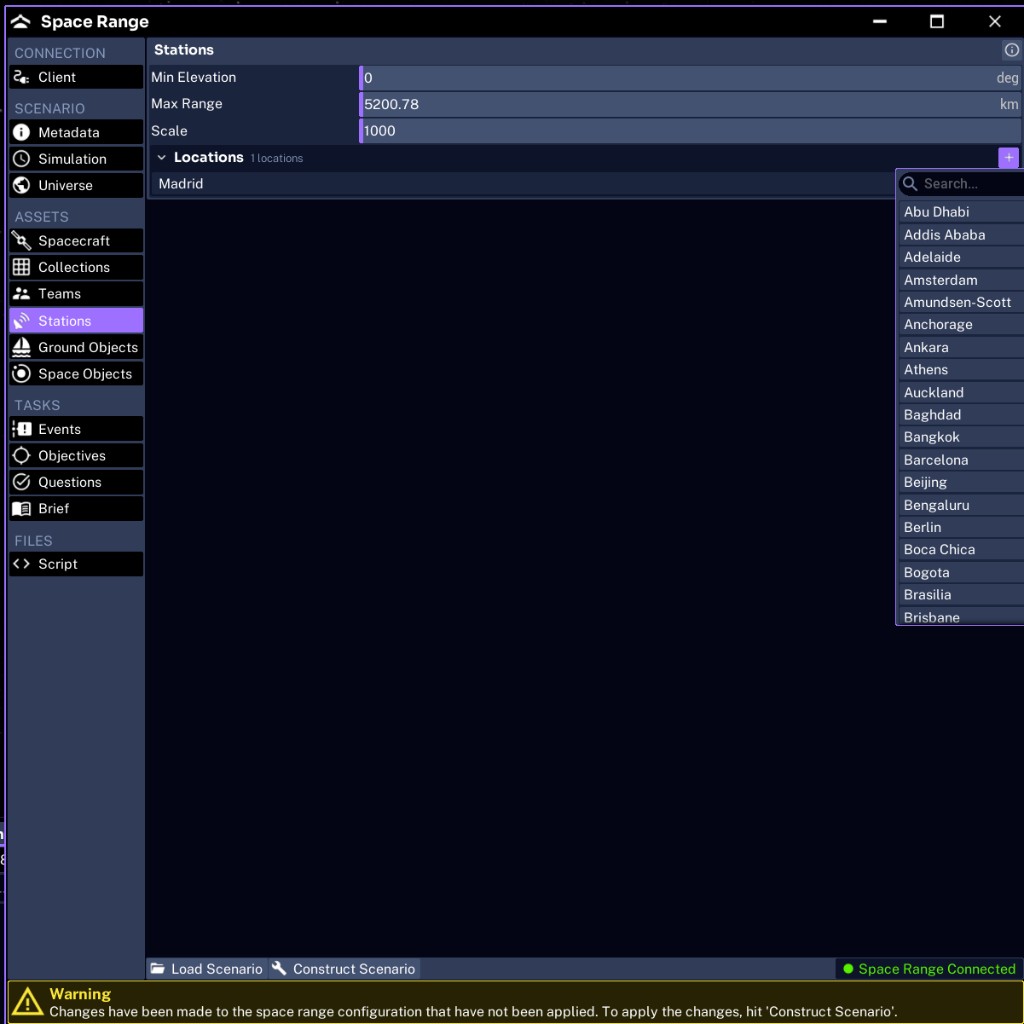
How the Stations tab is structured
Space Range stations are a single shared definition, not per-team objects. You provide a list of named locations plus a few global parameters that apply to every station.
| Field | Purpose | Default | JSON key |
|---|---|---|---|
| Minimum Elevation | The angle above the local horizon required for access, in degrees | 0 | ground_stations.min_elevation |
| Maximum Range | The maximum allowed slant range in km; 0 removes the cap | populated by the build | ground_stations.max_range |
| Scale | The visual size of each station marker | 1000 | ground_stations.scale |
| Locations | The list of station locations, chosen from the preset list | empty | ground_stations.locations |
In the Studio UI, Min Elevation, Max Range, and Scale apply to every station, and the Locations list sits below them with its own add control.
Adding stations for Pathfinder Checkout
Open Stations, select the add control next to Locations, and pick from the searchable preset list:
- Madrid
- Singapore
In the Studio UI you choose stations from this list, so you cannot misspell one. When you author stations in JSON instead, spell each preset exactly as it appears here, or Studio reports it and may skip or replace that station during construction.
The first valid station acts as the primary station when team ground controllers are created. Every enabled team shares the same station network.
WARNING
Do not leave the station list empty. Space Range cannot create the expected team ground-controller path without a ground station, and teams will join with no way to command their spacecraft.
Tuning access
A station does not guarantee continuous contact. Orbit, minimum elevation, maximum range, antenna properties, and the radio link all affect whether a pass closes.
- Raise Minimum Elevation to require higher, cleaner passes and shorter contact windows.
- Set Maximum Range to cap how far a station will reach; leave it at
0for no cap.
During testing, confirm Pathfinder actually gets passes over the configured network, that its transmitter and receiver are present, and that Blue Team’s frequency and key are correct.
For the general Studio ground-station model and access cones, see Creating Ground Stations.
Next, add surface objects.