
Space objects are passive orbital targets such as debris, spent rocket bodies, or non-operational satellites. They have an orbit and a visual appearance, but no Space Range controller and no component stack, so no team can command them and they publish no telemetry.
When to add space objects
Add a space object when the mission needs something in orbit to observe, track, rendezvous with, or avoid, but that nothing should control. Common uses are inspection targets, collision-avoidance hazards, and cluttered-sky training.
If operators must command the object or receive its telemetry, use a spacecraft definition instead.
Reviewing the fields
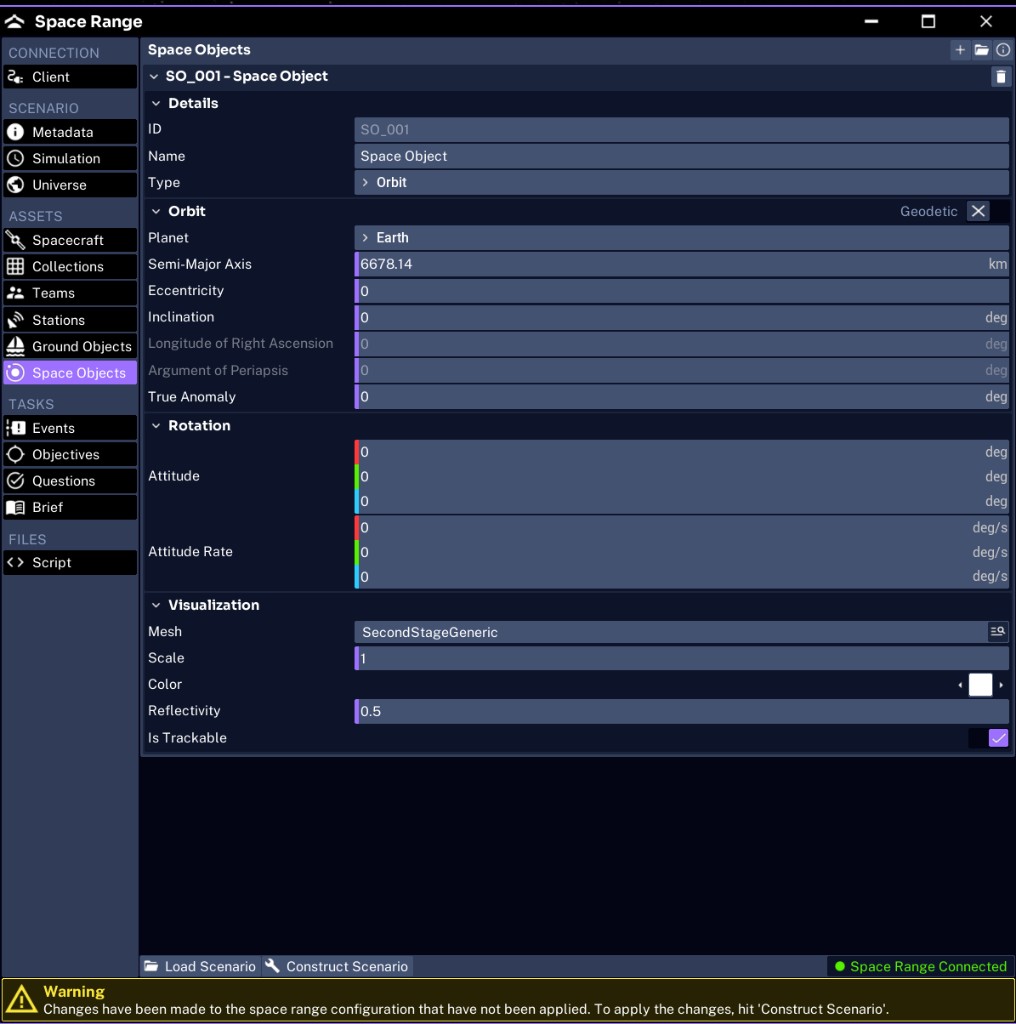
Each object is organized into Details, Orbit, Rotation, and Visualization groups.
| Group | Field | Purpose | JSON key |
|---|---|---|---|
| Details | ID | Shown in the UI as a handle such as SO_001; not serialized to JSON | |
| Details | Name | The display label | objects.space[].name |
| Details | Type | The motion model: Orbit, Static, Integration, or Lookup (default Orbit) | objects.space[].dynamic_type |
| Orbit | Planet | The central body | objects.space[].planet |
| Orbit | Semi-Major Axis | Orbit size in km (default 6678.14) | objects.space[].orbit |
| Orbit | Eccentricity, Inclination, Longitude of Right Ascension, Argument of Periapsis, True Anomaly | The remaining Keplerian elements | objects.space[].orbit |
| Rotation | Attitude | Initial orientation, as three axes in degrees | objects.space[].attitude |
| Rotation | Attitude Rate | Initial spin, as three axes in degrees per second | objects.space[].attitude_rate |
| Visualization | Mesh | The visual model (default SecondStageGeneric) | objects.space[].mesh |
| Visualization | Scale | Visual size | objects.space[].scale |
| Visualization | Color | Marker color | objects.space[].color |
| Visualization | Reflectivity | Surface reflectivity used for visibility (default 0.5) | objects.space[].reflectivity |
| Visualization | Is Trackable | Whether sensors can detect and track it (default on) | objects.space[].trackable |
Type sets how the object moves; Orbit coasts along the Keplerian elements. The Geodetic toggle in the Orbit section header is separate: it switches positioning from orbital elements to a fixed latitude, longitude, and altitude (the geodetic array in JSON). Pair a geodetic position with Static to pin a marker in place.
Adding an inspection target
For a rendezvous or inspection exercise, place a space object in an orbit close to the active spacecraft:
- Name:
Debris-1 - Planet: Earth
- Orbit: Keplerian elements near Pathfinder’s orbit
- Is Trackable: on, so sensors can find it
Offset the true anomaly slightly from the active spacecraft so the two do not start at the same point.
NOTE
A space object has no power, no fuel, and no commandable components. Attitude and orbit propagate, but nothing responds to operator commands.
Next, add a scenario event.