
Components determine what operators can command and what telemetry they can observe. Add components from the Components section of the Pathfinder entry under Spacecraft.
Adding the minimum operating stack
Add these components and keep each name unique:
| Component | Name | Why it is included |
|---|---|---|
| Solar Panel | Solar Panel | Generates electrical power |
| Battery | Battery | Stores electrical energy |
| Computer | Computer | Runs command and control behavior |
| Reaction Wheels | Reaction Wheels | Controls spacecraft attitude |
| Receiver | Receiver | Receives uplink commands |
| Transmitter | Transmitter | Sends telemetry and responses |
| Storage | Storage | Holds data for downlink |
Add a Camera named Camera if the brief asks participants to capture imagery.
Configuring a component
Each component expands into three parts:
- Details: the Class, operator-facing Name, and an Enabled toggle
- Visualization: mesh, position, rotation, and visual scale
- Data: a list of class-specific properties, each with its own unit, that you add or remove with the controls on the right
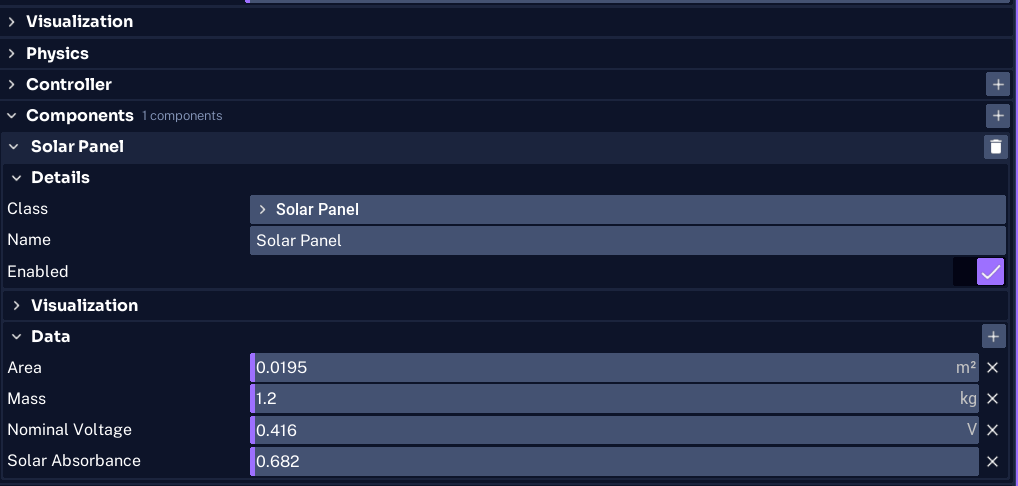
The Data list is populated with the class defaults when you add a component. A new Solar Panel, for example, loads with:
| Property | Default | Unit |
|---|---|---|
| Area | 0.0195 | m² |
| Mass | 1.2 | kg |
| Nominal Voltage | 0.416 | V |
| Solar Absorbance | 0.682 |
The available properties depend on the class, so the exact field names can vary between component types and Studio builds. Tune the defaults to suit the mission, or leave them for Pathfinder Checkout. Mass is the one property every component has.
Naming components for operators and events
Commands and Space Range events target components by name. Use:
- short, descriptive names
- one unique name per spacecraft
- stable names that will not change after the brief and events are written
If you add two cameras, name them by purpose, such as Nadir Camera and Rendezvous Camera.
Understanding power behavior
For a simple spacecraft, Space Range can create basic default power connections when no explicit bus is provided. This is sufficient for Pathfinder Checkout.
For a mission that depends on switching, fuses, regulators, multiple batteries, or cross-spacecraft power transfer, define an explicit power network through the Power Bus and its components. Explicit wiring replaces the simple automatic wiring.
WARNING
Adding power components does not guarantee a valid electrical network. Test battery charge, generation, and loads during the final simulation.
Adding component models
Models add behavior such as degradation, leakage, noise, or intermittent connections to a component. Only attach models supported by that component class.
You do not need an error model for the first Low Bit Rate event because that event changes the Transmitter directly. Later scenarios can use the documented presets under Events to find supported component and model combinations.
For normal Studio component placement and physical layout, see Configuring Components.