
Objectives award or deduct points automatically when the simulation state meets a condition. They are the mirror image of events: an event changes the world at a time, while an objective watches the world and scores it. Objectives run without any operator input, which makes them ideal for rewarding correct flying rather than correct answers.
Objectives compared with questions and events
| Mechanism | Trigger | Scores | Needs operator input |
|---|---|---|---|
| Question | Operator submits an answer | Yes | Yes |
| Objective | Simulation state meets a condition | Yes | No |
| Event | Configured simulation time | No | No |
Use a question to test what a participant knows, and an objective to reward or penalize what the spacecraft actually does.
Reviewing the fields
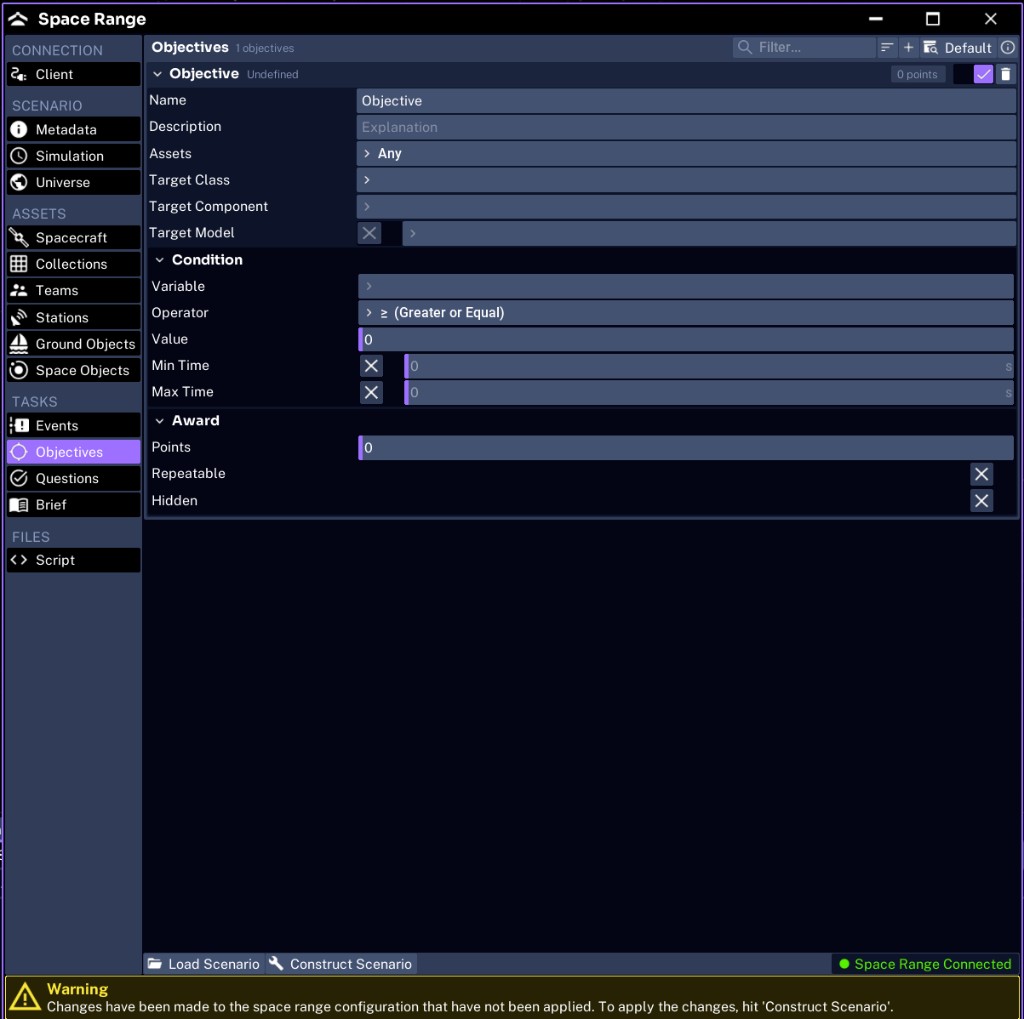
Each objective is organized into a header, a Condition group, and an Award group. The header carries the enabled toggle and a running points badge, and a preset dropdown at the top of the tab lets you start from a shipped objective instead of a blank one.
| Group | Field | Purpose | JSON key |
|---|---|---|---|
| Header | Enabled | Toggle on the objective header; whether it is active | objectives[].enabled |
| Header | Name | The objective label | objectives[].name |
| Header | Description | What the objective rewards | objectives[].description |
| Header | Assets | Which spacecraft the objective watches; defaults to Any | objectives[].assets |
| Header | Target Class | The component class to watch, such as Battery | objectives[].target |
| Header | Target Component | The specific named component, when narrowing to one | objectives[].target name |
| Header | Target Model | An optional error model on the component to watch | objectives[].target (model suffix) |
| Condition | Variable | The specific value being compared | objectives[].variable |
| Condition | Operator | The comparison, shown with friendly names such as ≥ (Greater or Equal) | objectives[].operation |
| Condition | Value | The value compared against | objectives[].value |
| Condition | Min Time | Optional lower time bound; enable it with the toggle | objectives[].min_time |
| Condition | Max Time | Optional upper time bound; enable it with the toggle | objectives[].max_time |
| Award | Points | Points awarded, or negative to deduct | objectives[].award.points |
| Award | Repeatable | Whether it can score more than once | objectives[].award.repeatable |
| Award | Hidden | Whether participants see its name before it scores | objectives[].hidden |
NOTE
The Studio UI splits the target into Target Class, Target Component, and Target Model. In the JSON these collapse into
target(class or component name, with a-Modelsuffix for a model) andtarget name(the component name). There is no domain field in the UI; every objective is a spacecraft objective.
Choosing an operator
The operator decides how Variable is compared to Value. The dropdown shows friendly names for each:
≥ (Greater or Equal)and≤ (Less or Equal)> (Greater)and< (Less)== (Equal)and!= (Not Equal)passes, which fires when the value crosses the threshold in either direction
Use ≥ or ≤ to reward reaching a threshold. Avoid == on a continuously changing value, since it almost never matches exactly; reserve it for discrete values such as a bool or an integer state.
Adding an objective to Pathfinder Checkout
Reward operators for keeping the battery healthy:
- Name:
Maintain Battery - Assets:
SC_001 - Target Class:
Battery - Variable:
Charge Fraction - Operator:
≥ (Greater or Equal) - Value:
0.5 - Points:
10
Optionally add a penalty objective that deducts points if the charge fraction drops below 0.1, using a negative Points value.
WARNING
The Variable and Target Class must match names and values the simulation actually produces. A misspelled variable silently never scores. Verify each objective by running the scenario and watching the score change.
Testing objectives
- construct the scenario
- run through the condition window
- confirm the score changes by the expected amount
- confirm a non-repeatable objective scores only once
- confirm a hidden objective stays hidden until it scores
Next, create the scored questions.